The Lean Stack: Build and Ship Ideas Fast with Python, Streamlit and Google Sheets-as-a-Backend (GSaaB)
A practical guide to building a working backend on a spreadsheet, connecting it to a Python application and getting data back to users.
Overview
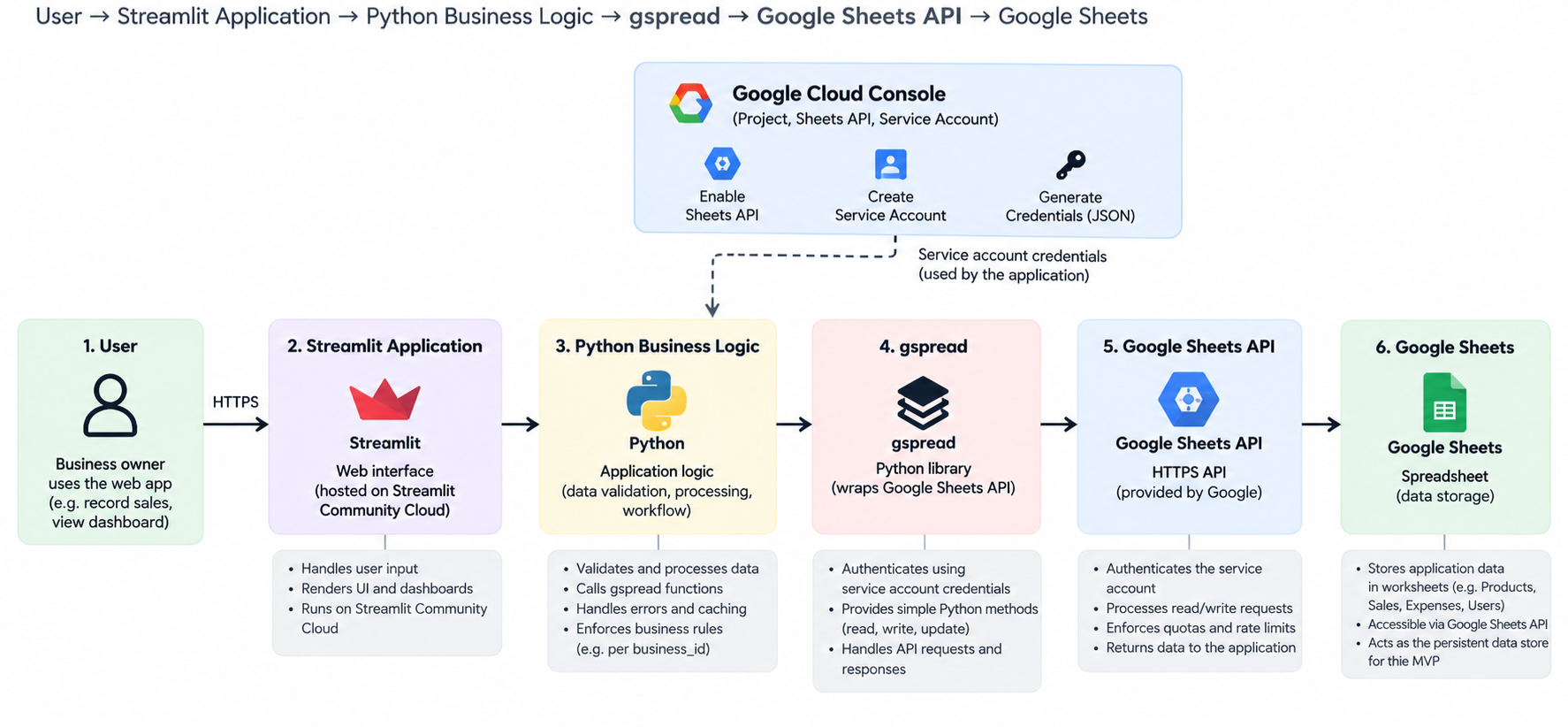
Building a SaaS product typically involves decisions about database infrastructure, backend services, authentication, hosting and application architecture. Implementing all these components before establishing whether an idea can become marketable may introduce development costs, complexity and delays that are difficult to justify at the validation stage.
As someone who likes to ship fast, test an idea in the market and see whether anyone will pay for it, architecting a sophisticated backend is usually the last card on my table at the beginning. My rationale is simple: the best early test is often a lean working MVP, powered by infrastructure that is inexpensive to build and manageable to operate. One approach I have found useful is Google Sheets-as-a-Backend (GSaaB).
Using a simple inventory-and-sales MVP as an example, this article discuss the usefuleness of this architecture for rapid prototyping, integration, runnable implementation, deployment, security, API quotas, concurrent-write limitations and the signs that it is time to migrate.
1. What Exactly is GSaaB Architecture?
Google Sheets-as-a-Backend (GSaaB) principle is based on using Google Sheets as a lightweight persistent data store, accessed through the official Google Sheets API by a server-side application. This is a name for an architectural pattern, not a separate Google product. It is not an attempt to turn a spreadsheet into PostgreSQL; it is a way to validate functionality and demand before committing to infrastructure that the product may not yet need.
Figure 1 presents eight logical components. They are not eight separate servers or eight mandatory network hops. For example, the service account supplies authentication credentials; it does not sit on the network as an independent proxy. Notifications are optional, while backup and recovery operate alongside normal requests.
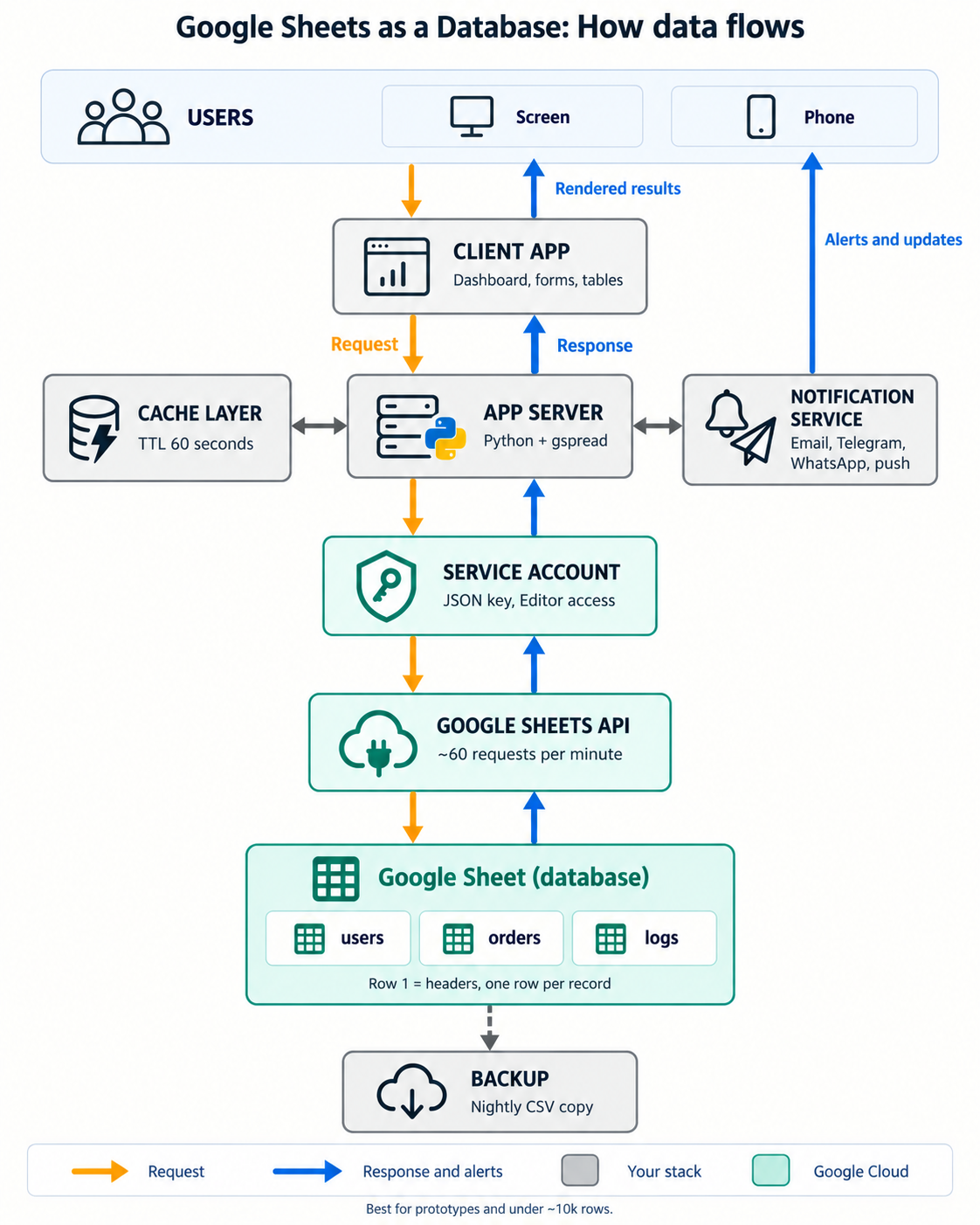
2. Middleware: From the architecture presented in Fig 1, this is composed of application server, cache and notifications. The application server validates requests, computes totals, authorises actions and calls the data-access functions. The cache holds recent read results and cuts down unnecessary Sheets API calls; unlike permanent storage, cached results expire or must be invalidated after changes. An optional notification service may send email, WhatsApp, Telegram or push alerts through appropriate external services. Google Sheets does not automatically send product-specific notifications when an application writes a row.
3. Gateway: This is composed of service account and Sheets API. A Google Cloud service account is a non-human identity for the application. Its credentials let the Python process authenticate when calling the Google Sheets API. The spreadsheet must be shared with the service account's email address with the appropriate permissions. This identity is not the same thing as logging in the application's end users; user authentication and authorisation must be implemented separately if required.
4. Storage and protection: Within the architecture, Google Sheets acts a storage, keeping tabular records inside worksheets. An additional backup and recovery process periodically saves independent copies and tests restoration. Version history is useful but should not be the only recovery strategy for valuable business data. These five categories—frontend, middleware, integration gateway, storage and data protection—describe the responsibilities of the architecture.
2. Creating and structuring the backend
Creating the GSaaB architecture is quite a simple process that can be achieved in four different steps that can be applied to any project case so far it is going to require a storage to hold and process some user data. In the context of this work, the idea is an inventory management app MVP whose backend that is based on GSaaB architecture is designed as follows:
2.1. Step 1: Design the Spreadsheet as Tables
The main purpose of this step is to create a google spreadsheet and structure it into an appropiate database schema which the product idea is going to use. The simple workflow to achieved this is as follows:
- Open googlesheet
- Create a spreadsheet and give it a desire a name (e.g.
Inventory_MVP_Database) with these worksheets. - Keep headers in the first row and avoid empty or inconsistent column names as indicated in the sample schema below.
| Worksheet | Illustrative fields |
|---|---|
Products |
product_id, business_id, name, price, stock |
Sales |
sale_id, business_id, product_id, quantity, total, date |
Expenses |
expense_id, business_id, amount, category, date |
Users |
user_id, business_id, role |
Debts |
debt_id, business_id, customer_id, amount, status |
The IDs can express relationships across worksheets, but Sheets does not enforce foreign keys, uniqueness or database transactions. The application must validate them. Never treat an editable business_id supplied by a client as proof that a user owns that business.
2.2. Step 2: Configure Google Cloud
In this step, the main goal is to create a google project for the product idea that is going to utilise the database design and structure created in Step 1. The simple workflow to achieve this is as follows:
- Visit Google Cloud Console
- Create a project (e.g.
InventoryManagement) - Click APIs & Services and navigate to Library
- Separately search for Google Sheets API and Google Drive API . Enable each of these APIs
- Click IAM & Admin, then Service Accounts and do the following
- Create a service account.
- Open the newly created service account
- Click keys → Add Key→Create new key.
This process will create a service-account JSON file that contains credentials. Download the file and keep it secret. Never push it to GitHub, include it in frontend JavaScript or publish it in a tutorial screenshot so that it doesn't get compromised.
2.3. Step 3: Grant Access to the Spreadsheet
In this step, the goal is to establish a "communication" between the Google Spreadsheet (i.e. Inventory_MVP_Database) created in Step 1 and the Google Service account created for project InventoryManagement in Step 2 so that the GSaaB backend architecture is ready for use. This can be achieved by ensuring programmatic access (i.e. giving the Service Account the permission to read and edit googlesheets) is important to avoid the common cause of permission denied or spread sheet not found. The simple workflow is this
- Open the downloaded service-account JSON file
- Copy the
client_emailfrom the service account credentials. It is typically donated as projectxyzadmin@projectxyz.iam.gserviceaccount.com. - Open the Googlesheet (i.e.
Inventory_MVP_Database) and share it with the copiedclient_email, granting it Editor access so that the application can append and update rows
Successful execution of Step 1 to 3 will create the ready-to-use GSaaB archietecture that can be connected to a frontend through which users can perform different operations permitted within the scope of the application business logic
3. Connecting Python and Streamlit
To ascertain the proper functioning of the GSaaB architecture, a local implementation is important following this workflow
3.1. Step 1: Set up the Project
The example uses the following structure:
inventory-mvp/
├── app.py
├── requirements.txt
├── .gitignore
└── .streamlit/
    └── secrets.toml        # local only; never commit
Install the dependencies notably streamlit and gspread (a python 3+ library that lets python script interact with Google Sheets, read or write to it using the Google Sheets API).
3.2. Step 2: Store Credentials Safely
This step In a local .streamlit/secrets.toml file, configure the spreadsheet ID and service-account fields. Here the actual JSON values should be used; the snippet deliberately shows placeholders that exactly look like the format presented as follows
spreadsheet_id = "YOUR_SPREADSHEET_ID"

[gcp_service_account]
type = "service_account"
project_id = "YOUR_PROJECT_ID"
private_key_id = "YOUR_PRIVATE_KEY_ID"
private_key = """-----BEGIN PRIVATE KEY-----
YOUR_PRIVATE_KEY
-----END PRIVATE KEY-----
"""
client_email = "YOUR_SERVICE_ACCOUNT_EMAIL"
client_id = "YOUR_CLIENT_ID"
token_uri = "https://oauth2.googleapis.com/token"
The spreadsheet ID is the long value between /d/ and /edit in the Sheets URL. :
3.3. Step 3: Full runnable app.py
This example deliberately keeps its scope narrow: record a sale and display saved sales. It does not decrease inventory, process payments or enforce multi-tenant permissions. A successful append confirms the record was written, not that a real-world sale was financially reconciled.
import uuid
from datetime import date

import gspread
import streamlit as st
from gspread.exceptions import APIError, SpreadsheetNotFound

st.set_page_config(page_title="Inventory MVP", layout="wide")
st.title("Inventory & Sales MVP")
st.caption("Powered by Python, Streamlit and Google Sheets")


@st.cache_resource
def connect_sheet():
    credentials = dict(st.secrets["gcp_service_account"])
    client = gspread.service_account_from_dict(
        credentials,
        scopes=["https://www.googleapis.com/auth/spreadsheets"],
    )
    return client.open_by_key(st.secrets["spreadsheet_id"])


@st.cache_data(ttl=60)
def get_sales():
    worksheet = connect_sheet().worksheet("Sales")
    return worksheet.get_all_records()


def save_sale(business_id, product_id, quantity, unit_price):
    sale_id = str(uuid.uuid4())
    total = round(quantity * unit_price, 2)
    sale_date = date.today().isoformat()
    worksheet = connect_sheet().worksheet("Sales")
    worksheet.append_row(
        [sale_id, business_id, product_id, quantity, total, sale_date],
        value_input_option="RAW",
    )
    get_sales.clear()
    return sale_id


st.subheader("Record a sale")
with st.form("sales_form"):
    business_id = st.text_input("Business ID", value="BIZ001")
    product_id = st.text_input("Product ID")
    quantity = st.number_input("Quantity", min_value=1, step=1)
    unit_price = st.number_input(
        "Unit price", min_value=0.01, step=0.01, format="%.2f"
    )
    submitted = st.form_submit_button("Save transaction")

if submitted:
    if not business_id.strip() or not product_id.strip():
        st.error("Business ID and Product ID are required.")
    else:
        try:
            sale_id = save_sale(
                business_id.strip(),
                product_id.strip(),
                int(quantity),
                float(unit_price),
            )
            st.success(f"Sale recorded: {sale_id}")
        except (APIError, SpreadsheetNotFound, OSError):
            st.error("Unable to save the transaction. Check the connection.")

st.divider()
st.subheader("Sales records")
try:
    sales = get_sales()
    if sales:
        st.dataframe(sales, use_container_width=True, hide_index=True)
        total_sales = sum(float(row.get("total", 0)) for row in sales)
        st.metric("Total recorded sales", f"{total_sales:,.2f}")
    else:
        st.info("No sales recorded yet.")
except (APIError, SpreadsheetNotFound, OSError):
    st.error("Unable to retrieve records from Google Sheets.")
In this code snippet, the connection function uses st.cache_resource to reuse the authenticated spreadsheet resource. That is not the same as caching the worksheet contents. The get_sales() function separately uses st.cache_data(ttl=60) to temporarily reuse retrieved rows. After appending a row, the example clears that cached function's results so a refresh can display new data. The example catches common API and connection errors, but it is intentionally minimal. Production applications should use structured logging, retry/backoff for transient failures, careful numeric handling (such as Decimal for money), server-derived tenant identity, request idempotency and more granular exception handling.
4. From request to response: the complete workflow
Figure 2 follows a single form submission from the interface to the worksheet and back.

The application does not expose its service-account credentials to the browser. Python receives the form values, checks the required fields, computes the total and calls append_row. The Sheets API writes the record and returns a response. The application then invalidates its cached sales result and renders the updated data on the next read. If the append fails, the code does not claim the transaction was saved.
A subtle point is worth emphasising: a failed or interrupted network response can create uncertainty about whether a write completed. An application processing valuable transactions should therefore use idempotency safeguards to prevent duplicate submission on retries.
5. Deployment on Streamlit Community Cloud
With the application working locally, the next step is to put it online following this simple workflow:
- Push
app.pyandrequirements.txtto a GitHub repository; confirm secrets are not committed. - Open Streamlit Community Cloud and connect the repository.
- Select
app.pyas the application entry point. - Copy the required TOML secrets into the app's secrets configuration.
- Deploy, test a sample write, refresh the dashboard and check the
Salesworksheet.
A small MVP may fit within available free-tier allowances, but zero infrastructure cost is not a capacity guarantee. Hosting limits, workloads, formulas, request frequency, data size and API quotas determine practical performance. Thus it is importnat to avoid promising a fixed number of concurrent users without testing the actual workload.
6. Where GSaaB starts to struggle
Although GSaaB architecture is fast and easily to build, it is not scalable. The important limitations to watch out for include:
1. API limits and the importance of caching : Google publishes per-minute quotas for the Sheets API. Its documented standard quotas include 300 read requests per minute per project, 60 read requests per minute per user per project, 300 writes per minute per project and 60 writes per minute per user per project. Google may change these limits, so check the current official documentation when deploying. This is very important.
2. Concurrent writes and correctness: Imagine a product with one unit left and two people attempting a purchase simultaneously. Both requests could read the same stock value and both proceed. Sheets supports atomic handling of individual requests, but it does not supply a general transactional database mechanism spanning a sequence like check stock → record sale → decrement stock → record payment. This is a major reason not to rely on GSaaB alone for financially or operationally critical workflows requiring strong consistency.
3. No native relational database constraints: The spreadsheet can hold product_id and business_id, but it will not automatically enforce foreign keys, unique indexes, joins or row-level security. Your server must reject invalid IDs, enforce ownership and validate inputs. Even with careful code, concurrent edits may undermine assumptions that a real transactional database can enforce more reliably.
4. Growing datasets and expensive reads: Calling get_all_records() on every large worksheet can become slow. As data grows, every refresh may transfer far more information than the page actually needs. There is no magical 10,000-row limit at which Sheets stops working; practical performance depends on record width, formulas, API traffic, caching, access patterns and hosting resources. Use targeted range reads and plan a migration when query needs begin to exceed the spreadsheet pattern.
7. Knowing when to migrate
The right time to migrate is when real product requirements begin to exceed the pattern's strengths. Here are important migration signals to watch out for:
| Trigger | What it means |
|---|---|
| Repeated API quota errors | Traffic or access patterns exceed practical request capacity |
| Simultaneous stock or payment operations | You need stronger transaction guarantees |
| Complex multi-table relationships | You need joins, constraints and indexed queries |
| Per-user and per-business isolation | You need enforceable data access policies |
| Frequent large reads | Search, filtering and reporting have become inefficient |
| Higher recovery requirements | You need more systematic recovery and auditability |
A migration to PostgreSQL or a managed PostgreSQL service such as Supabase typically involves schema design, export, data cleansing, imports, creation of constraints and indexes, authentication and authorisation changes, and careful testing. A planned cutover must also prevent lost writes or duplicates.
8. The economics of a lean validation stack
The argument for GSaaB is not that Sheets is a better database engine. It is that a developer trying to validate an idea may learn more from a modest functioning product than from weeks spent building infrastructure before anyone uses it. At the validation stage I care about a different set of questions:
- Does the product solve a real problem?
- Can a user complete the key task?
- Will that user return?
- Will anyone pay?
The last question is arguagbly the most important for a commercial SaaS. A sophisticated stack cannot manufacture demand. On the other hand, a lean stack should not become an excuse for insecure credentials, misleading capacity promises or unreliable business transactions. Those are boundaries, not features to postpone indefinitely. In the end, my preferred approach is to match engineering investment to the stage of the product. Start with a simple architecture where the workload permits it; instrument and observe real usage; then upgrade the architecture when product evidence and technical requirements justify it.
9. Conclusion
Google Sheets can serve as a useful lightweight storage backend for prototypes, internal tools and modest MVPs when combined with Python, Streamlit and the Google Sheets API. A user can submit a form, the server can process it, an authenticated API call can persist the record, and the interface can retrieve the result without deploying a conventional database at the outset. But Sheets is not PostgreSQL. Quotas, concurrency, relational constraints, record-level permissions, inefficient large reads and recovery needs all impose genuine limits. Treat those limits as architectural design inputs rather than surprises. For someone testing whether an idea can attract its first users and paying customers, that is the lesson of GSaaB:
- Build lean
- Ship the MVP
- Validate the demand, and engineer for the scale the product actually needs.
10. Technical references
- Google for Developers. Google Sheets API usage limits.
- Google for Developers. Read and write cell values.
- Google for Developers. Append values API reference.
- Google for Developers. Service accounts overview.
- Streamlit. Secrets management.
- Streamlit. Caching overview.
- gspread. Python client documentation.
Implementation note: This article's runnable application is an educational demonstration, not a production-ready multi-tenant inventory or payments system.
Questions & Discussion
Questions, corrections, criticism and alternative approaches are welcome.